HALO IN 60: Configuring Chat in HaloITSM
Chat is one of the quickest things to switch on in HaloITSM and one of the easiest to leave half configured. Everything lives on one screen, Configuration > Chat, split into three sections. This is an episode of HALO IN 60, our series that takes one configuration screen at a time, and it covers the ten settings that decide how a chat actually reaches a human.
User chat Settings
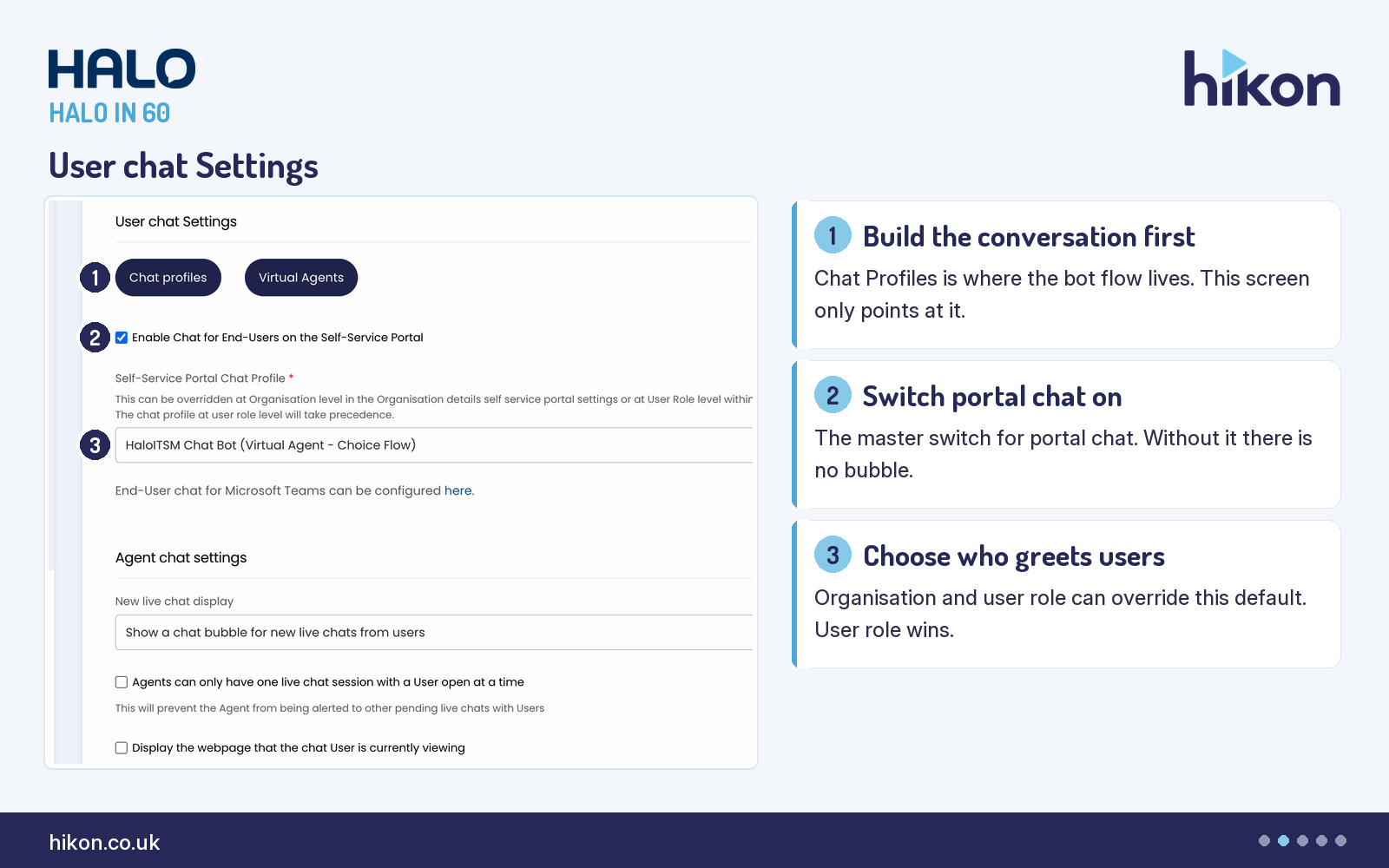
1. Chat profiles
The button at the top of the screen is the most important thing on it, and it is easy to walk past. Chat Profiles is where the conversation itself is defined, letting users and agents interact with an automated chat bot to get information or run requests. Everything else on this screen decides how that profile is reached, not what it says.
2. Enable Chat for End-Users on the Self-Service Portal
Tick this and the live chat bubble appears on the portal. Until it is ticked there is no bubble, whatever else is configured below, and in our experience that is a common reason a correctly built chat profile appears to do nothing. Note the scope: this setting governs the Self-Service Portal, and the screen points elsewhere for Microsoft Teams end-user chat.
3. Self-Service Portal Chat Profile
This sets the default profile that runs the portal chat experience, and it is a required field. It is a default rather than a lock: the live screen states it can be overridden at Organisation level in the Organisation details self service portal settings, or at User Role level within the Role permissions, and that the profile set at user role level takes precedence. That order matters when you want one audience to meet a different first responder from everyone else.
Agent chat settings
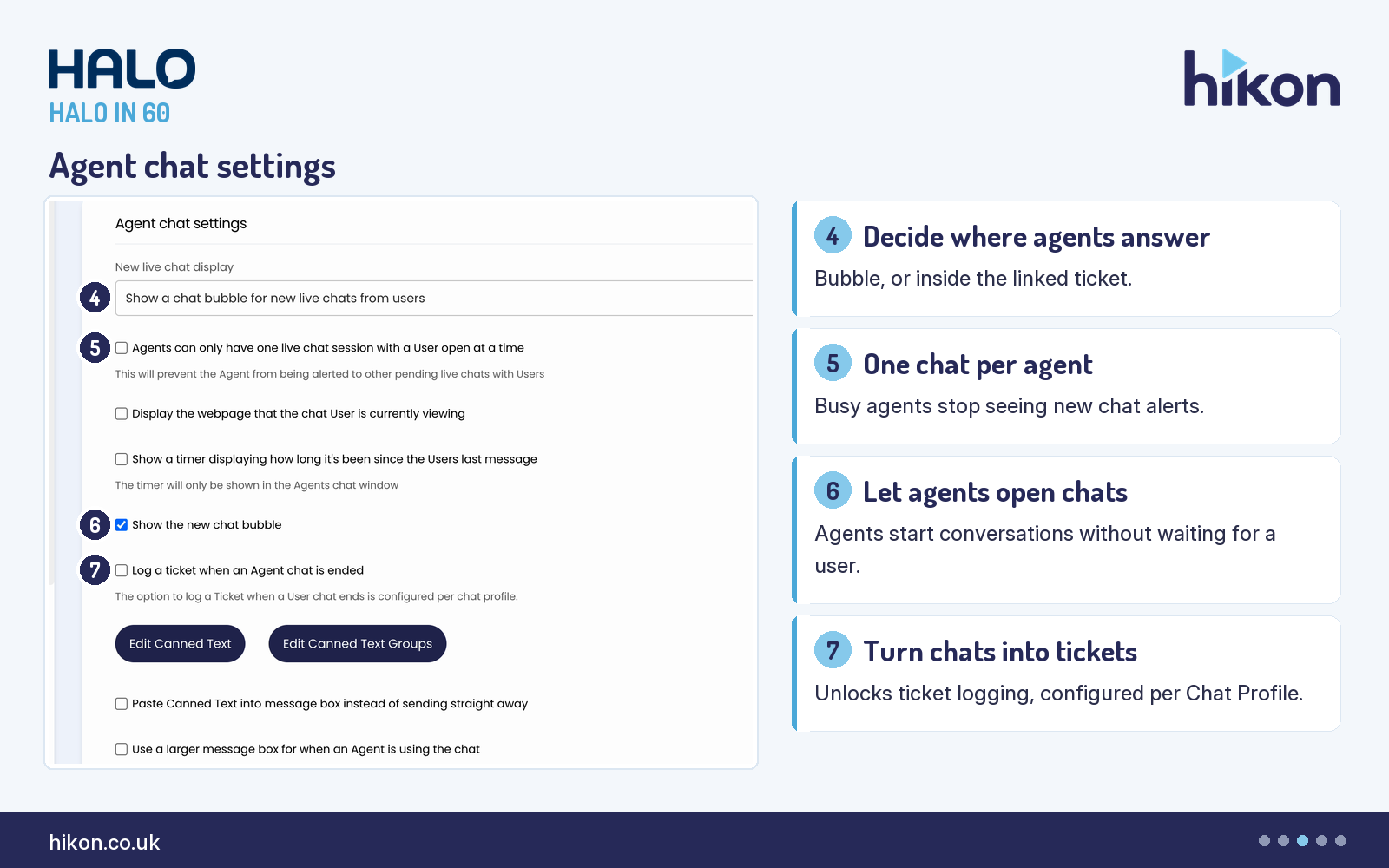
4. New live chat display
This decides where an agent interacts with a chat once a user starts it. One option is a pop-up bubble for the assigned agent. The other puts the chat inside the user's ticket, which keeps the conversation and the record together. If no ticket existed before the chat began, the chat flow has to create one and assign both the end user and the agent, or neither of them can see it.
5. Agents can only have one live chat session with a User open at a time
With this on, an agent can join only one chat at a time, and an agent already in a chat is not alerted to new ones. It trades throughput for attention. We turn it on where conversations are complex enough that a half-read reply costs more than a slightly longer queue, and leave it off on high-volume desks handling short questions.
6. Show the new chat bubble
This gives agents a bubble at the bottom right so they can start a conversation themselves rather than waiting for a user to open one. Worth knowing before you switch it off: agents can still see ongoing chats and recently closed ones either way, so turning it off removes the ability to initiate, not the ability to participate.
7. Log a ticket when an Agent chat is ended
This makes it possible to configure Chat Profiles to log a ticket when an agent chat finishes, and adds an option for which ticket type gets logged. Note where the work actually happens: the live screen states the behaviour is configured per chat profile, so ticking this here enables the capability rather than switching the logging on. Different chat flows can then log different ticket types.
Advanced Settings
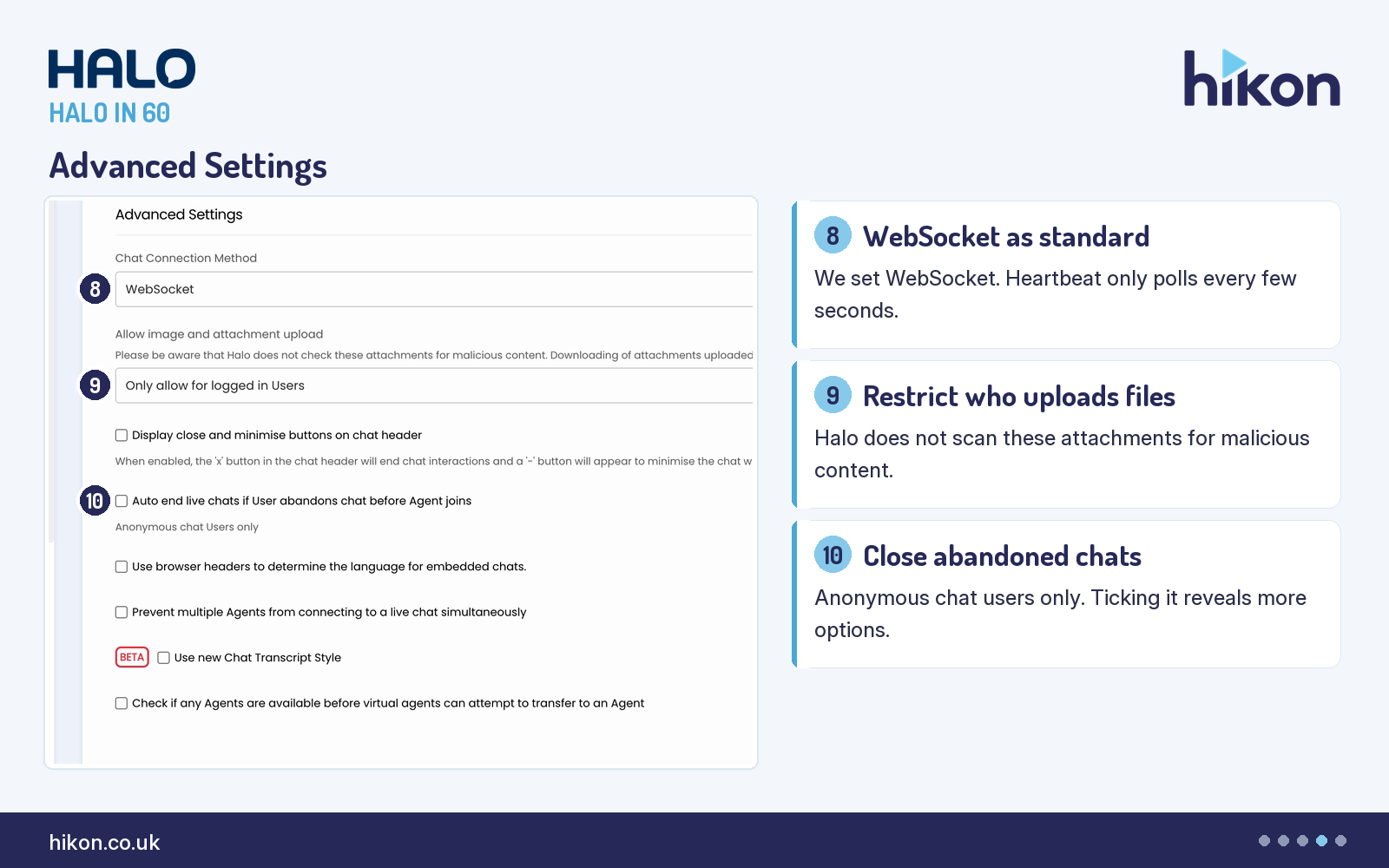
8. Chat Connection Method
Heartbeat pings for new messages every few seconds. WebSocket uses a WebSocket for near instantaneous communication, still subject to the connection itself. We set WebSocket as standard, because a few seconds of delay on every message is felt by both sides of a live conversation even when nothing is technically wrong.
9. Allow image and attachment upload
This decides whether files can be sent through chat and, if so, whether that is restricted to authorised users or open to all. The screen carries a warning worth reading twice: Halo does not check these attachments for malicious content, and downloading a user-uploaded attachment is done at the agent's own risk. Restricting uploads to logged in users is the sensible default for most service desks, and it is what the instance in these screens uses.
10. Auto end live chats if User abandons chat before Agent joins
This closes chats automatically when a user has been inactive for a set period, and it applies to anonymous chat users only. Ticking it reveals further options: how long before the user is prompted to confirm they are still waiting, how long since queuing or the last confirmation before the chat auto closes, whether the linked ticket closes too, and which category defaults to stamp on an abandoned chat's ticket. Those last four only appear once this is on, which is why they are absent from the screen above.
Where teams get this wrong
Three patterns come up repeatedly. The first is configuring this screen and expecting the conversation to change, when the flow lives in Chat Profiles. The second is the override order on the portal chat profile: teams set it here, then wonder why a particular role sees something else, because the role-level profile takes precedence. The third is treating ticket logging as done once the box on this screen is ticked, when the logging itself is configured per chat profile. One more worth flagging: the live screen marks Use new Chat Transcript Style as BETA, so we would not build a process around it yet.
Need a hand?
Hikon configures HaloITSM for organisations that would rather it worked properly the first time. If you want a second pair of eyes on your Chat configuration, see our HaloITSM services.
Vendor reference: Halo guide: Chat. Screens were captured from a live instance; where the guide and the interface differ, this article follows the interface.
Enjoying this?
Talk it through with the people who wrote it — a free 20-minute call, no pitch.
Let's talk →